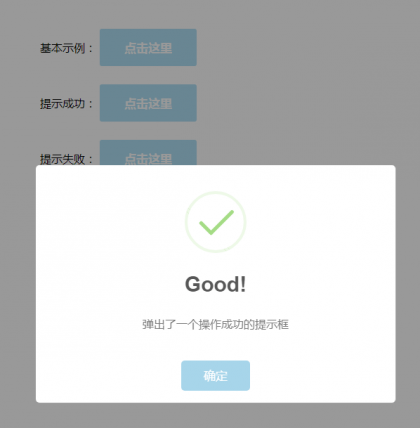
演示效果:部分代码:<!DOCTYPE html PUBLIC "-//W3C//DTD XHTML 1.0 Transitional//EN" "http://www.w3.org/TR/xhtml1/DTD/xhtml1-transitional.dtd">
<html xmlns="http://www.w3.org/1999/xhtml">
<head>
<meta http-equiv="Content-Type" content="text/html; charset=utf-8" />
<title>演示:SweetAlert - 演示6种不同的提示框效果</title>
<meta name="keywords" content="提示框插件,SweetAlert" />
<meta name="description" content="SweetAlert可以替代Javascript原生的alert和confirm等函数呈现的弹出提示框,它将提示框进行了美化,并且允许自定义,支持设置提示框标题、提示类型、内容展示图片、确认取消按钮文本、点击后回调函数等。" />
<link rel="stylesheet" type="text/css" href="sweetalert.css"/>
<style>
.demo{width:300px; margin:60px auto 10px auto}
@media only screen and (min-width: 420px) {
.demo{width:500px; margin:60px auto 10px auto}
}
button, .button {
background-color: #AEDEF4;color: white;border: none;box-shadow: none;
font-size: 17px;font-weight: 500;font-weight: 600;
border-radius: 3px;padding: 15px 35px;margin: 26px 5px 0 5px;cursor: pointer; }
button:hover, .button:hover {background-color: #a1d9f2; }
</style>
</head>
<body>
<div class="demo">
<div class="demo_1">
基本示例:<button>点击这里</button>
</div>
<div class="demo_2">
提示成功:<button>点击这里</button>
</div>
<div class="demo_3">
提示失败:<button>点击这里</button>
</div>
<div class="demo_4">
提示确认:<button>点击这里</button>
</div>
<div class="demo_5">
定义内容:<button>点击这里</button>
</div>
<div class="demo_6">
确认输入:<button>点击这里</button>
</div>
</div>
<script type="text/javascript" src="jquery.js"></script>
<script type="text/javascript" src="sweetalert.min.js"></script>
<script type="text/javascript">
$(function() {
$(".demo_1 button").click(function() {
swal("这是一个信息提示框!");
});
$(".demo_2 button").click(function() {
swal("Good!", "弹出了一个操作成功的提示框", "success");
});
$(".demo_3 button").click(function() {
swal("OMG!", "弹出了一个错误提示框", "error");
});
$(".demo_4 button").click(function() {
swal({
title: "您确定要删除吗?",
text: "您确定要删除这条数据?",
type: "warning",
showCancelButton: true,
closeOnConfirm: false,
confirmButtonText: "是的,我要删除",
confirmButtonColor: "#ec6c62"
}, function() {
$.ajax({
url: "do.php",
type: "DELETE"
}).done(function(data) {
swal("操作成功!", "已成功删除数据!", "success");
}).error(function(data) {
swal("OMG", "删除操作失败了!", "error");
});
});
});
$(".demo_5 button").click(function() {
swal({
title: "Good!",
text: '自定义<span style="color:red">图片</span>、<a href="#">HTML内容</a>。<br/>5秒后自动关闭。',
imageUrl: "images/thumbs-up.jpg",
html: true,
timer: 5000,
showConfirmButton: false
});
});
$(".demo_6 button").click(function() {
swal({
title: "输入框来了",
text: "这里可以输入并确认:",
type: "input",
showCancelButton: true,
closeOnConfirm: false,
animation: "slide-from-top",
inputPlaceholder: "填点东西到这里面吧"
}, function(inputValue) {
if (inputValue === false)
return false;
if (inputValue === "") {
swal.showInputError("请输入!");
return false
}
swal("棒极了!", "您填写的是: " + inputValue, "success");
});
});
});
</script>
</body>
</html>






评论
144条评论111 Lv.1 Chrome 105.0.0.0
 Windows 回复
111111111111AFHFe给对方手机
江苏省常州市 电信
大Q Lv.1 Chrome 86.0.4240.198
 Windows 7 x64 Edition 回复
新人报道表情学习一下
辽宁省葫芦岛市 联通
晓日明月 Lv.1 Chrome 94.0.4606.71
 Windows 回复
新人报道 学习一下
湖南省邵阳市邵东县 联通
雪野,夜苍狼 Lv.1 Chrome
 Android 12 回复
山东省济南市 移动
诚信妹子 Lv.1 Chrome 105.0.0.0
 Windows 回复
河北省石家庄市 联通
LY Lv.1 Chrome 105.0.0.0
 Windows 7 x64 Edition 回复
真的吗
北京市 移动
dasd日暮溫柔 Lv.1 Internet Explorer 11.0
 Windows 7 x64 Edition 回复
辽宁省 移动
ghgbhghgbh Lv.1 Chrome 76
 Android 11 回复
支持
北京市 移动
xjbz5566 Lv.1 Chrome 105.0.0.0
 Windows 回复
前来学习 支持楼主发帖
中国 移动
Frady2017 Lv.1 Chrome 105.0.0.0
 Windows 回复
支持支持
浙江省 电信